
Know where to work next.
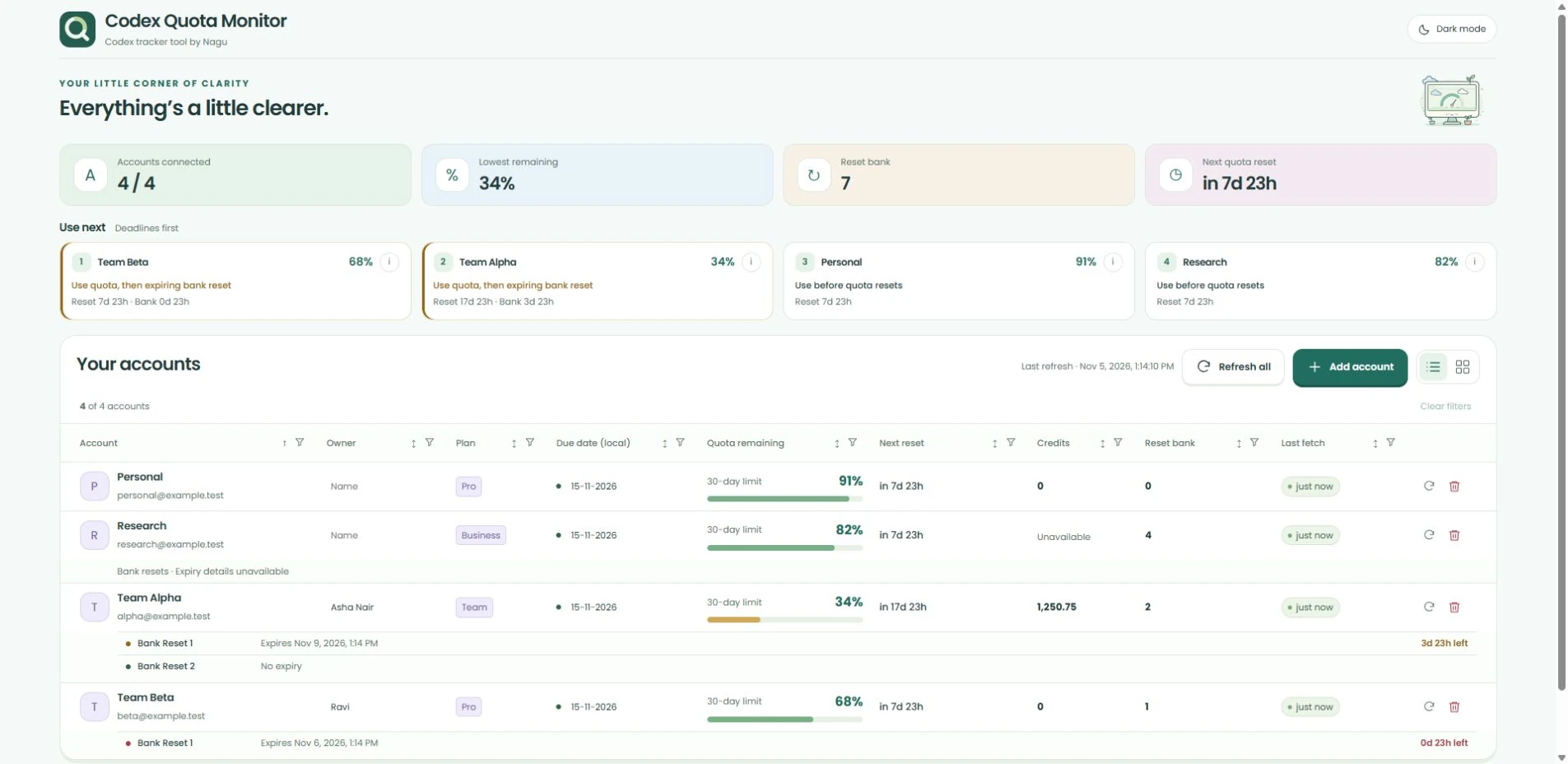
Up to four suggested accounts, ordered using remaining quota, reset timing and expiring bank resets. Open the reason behind each suggestion. Estimates guide your choice; you stay in control.
Now on Microsoft Store · Built for Windows
Your Codex accounts, with room to breathe. See what’s left, what resets next, and which account deserves your attention—all in one calm little desktop app.
A clearer view, day or night.
Less checking. More doing.
Up to four suggested accounts, ordered using remaining quota, reset timing and expiring bank resets. Open the reason behind each suggestion. Estimates guide your choice; you stay in control.
See usable bank resets and their reported expiry dates right below each account. A gentle shift from green to amber to red brings approaching deadlines into focus.
Share an IP and port over your trusted office network. Teammates see the same dashboard and can refresh it. No second Codex login, and account changes stay on your desktop.
Small things, thoughtfully made
Keep owners and due dates alongside your accounts. Refresh when you need to, or let the hourly check do its thing. Switch between light and dark. Your latest readings and protected sign-ins stay on your computer—without historical charts, prompts or conversations to sift through.
Made by Nagu
Your accounts, next-account suggestions, bank-reset expiries and LAN sharing—all in one calm desktop app.
Get it from Microsoft Store for easy installation and updates. Prefer a direct installer? The unsigned EXE is here too.
macOS and Linux support is in development. We’ll offer downloads after native validation.
Explore more of our work ↗Windows 10/11 · x64
Recommended
Install and keep up to date through Windows.
Direct download · v1.5.1
Includes the sign-in recovery fix. Windows may show an unknown-publisher warning.
Checking EXE details… The direct installer is enabled after its release details load.
A few useful details
The available release supports Windows 10/11 on x64. You need internet access, a browser and a ChatGPT account with Codex access that you are authorized to connect. No separate Nagu account, Node.js installation or terminal setup is needed. macOS and Linux packages are still being validated.
It is free for personal and internal business use. The app is proprietary freeware; it is not an open-source product. OpenAI subscriptions and other third-party costs are separate. Read the product license for use and redistribution terms.
The refreshed app starts a local sharing server while it runs. Share its IP and port with teammates on a trusted network. Anyone who can reach it can view account emails and readings and use Refresh all, without a password. They cannot change accounts, and saved credentials are not sent to them. Quit the app to stop sharing. The LAN connection uses HTTP, not HTTPS. Read desktop privacy.
Suggestions are estimates based on the latest successful readings, reset timing and observed usage. Bank-reset expiries appear when the provider reports them. The app cannot guarantee future capacity or change provider limits; refresh before an important decision.
Microsoft Store is the recommended option: Windows manages installation and updates. The direct EXE is unsigned, so Windows may show SmartScreen or unknown-publisher warnings. Its download instructions include the filename and SHA-256 checksum. The Store and EXE editions use separate local profiles; connected accounts are not automatically imported between them. For help, email hello@nagu.co.